Shared info of IoT & Cloud, Banking, Angular Wicket, Spring Reactive, AI, Flutter, E-comm, Java Telecomm and More.

Friday, October 7, 2016

Đọc, xuất XLS,XLSX,CSV file trong Java

Một số khái niệm:

JExcelAPI, which is a mature, Java-based open source library that lets you read, write, and modify Excel spreadsheets. JExcelAPI's jexcelapi home directory contains a jxl.jar file that contains demos for reading, writing, and copying spreadsheets.
jXLS 1.x provides jxls-reader module to read XLS files and populate Java beans with spreadsheet data.
Jxls v2.x tương tự jXLS 1.x  nhưng đã có nhiều đặc tính mà phiên bản 1.x không có.
HSSF (Horrible SpreadSheet Format) – Use to read and write Microsoft Excel '97(-2007) (XLS) format files.
XSSF (XML SpreadSheet Format) – Used to reading and writting Excel 2007 OOXML - Open Office XML (.xlsx) format files.
SXSSF (package: org.apache.poi.xssf.streaming) is an API-compatible streaming extension of XSSF to be used when very large spreadsheets have to be produced, and heap space is limited. SXSSF achieves its low memory footprint by limiting access to the rows that are within a sliding window, while XSSF gives access to all rows in the document. Older rows that are no longer in the window become inaccessible, as they are written to the disk.
HWPF (Horrible Word Processor Format) – to read and write Microsoft Word 97 (DOC) format files.
HSMF (Horrible Stupid Mail Format) – pure Java implementation for Microsoft Outlook MSG files
HDGF (Horrible DiaGram Format) – One of the first pure Java implementation for Microsoft Visio binary files.  
HPSF (Horrible Property Set Format) – For reading “Document Summary” information from Microsoft Office files.
HSLF (Horrible Slide Layout Format) – a pure Java implementation for Microsoft PowerPoint files.
HPBF (Horrible PuBlisher Format) – Apache's pure Java implementation for Microsoft Publisher files.
DDF (Dreadful Drawing Format) – Apache POI package for decoding the Microsoft Office Drawing format.
Opencsv is a very simple csv (comma-separated values) parser library for Java. It can dump out SQL tables to CSV:
     java.sql.ResultSet myResultSet = ....
     writer.writeAll(myResultSet, includeHeaders);
and It can bind CSV file to a list of Javabeans using CsvToBean, ColumnPositionMappingStrategy, HeaderColumnNameMappingStrategy classes.
Jasperreport java & JFrame VN apps

Các ví dụ:

Ví dụ dùng thư viện jxl:
WorkbookSettings wbSettings = new WorkbookSettings();
        wbSettings.setEncoding("UTF-8");
        Workbook workbookTemplate = null;
        workbookTemplate = Workbook.getWorkbook(new File(templateRealPath), wbSettings);
        ByteArrayOutputStream outputStream = new ByteArrayOutputStream();
        WritableWorkbook copy = Workbook.createWorkbook(outputStream, workbookTemplate);
        workbookTemplate.close();
        WritableSheet sheet = copy.getSheet(0);
        sheet.setName(sheetName);
.....
copy.write(); // Writes out the data held in this workbook in Excel format, to outputStream
        copy.close();       
        OutputStream os = new BufferedOutputStream(new FileOutputStream(realPath));
        outputStream.writeTo(os);
        outputStream.close();

Ví dụ dùng thư viện jxls 1.x:
package jxls.example;

import java.util.Collection;
import java.util.HashMap;
import java.util.HashSet;
import java.util.Map;
import net.sf.jxls.transformer.XLSTransformer;

/**
 *
 * @author 
 */
public class EmployeeEx {

    public static void main(String[] args) throws Exception {
        Collection staff = new HashSet();
        staff.add(new Employee("Derek", 35, 3000, 0.30));
        staff.add(new Employee("Elsa", 28, 1500, 0.15));
        Map beans = new HashMap();
        beans.put("employee", staff);
        XLSTransformer transformer = new XLSTransformer();
        transformer.transformXLS("employeeTemplate.xls", beans, "employeeOut.xls");
    }
}

Tham khảo:

Apache POI Quick Guide

Friday, September 30, 2016

Thursday, September 1, 2016

Hibernate commands

What is the difference between transient, a persistent and detached object in Hibernate?


Both save() and persist() are used to insert a new entity in the database. You're calling them on entities that already exist in the database. So they do nothing.
The main difference between them is that save() is Hibernate-proprietary, whereas persist() is a standard JPA method. Additionally, save() is guaranteed to assign and return an ID for the entity, whereas persist() is not.
update() is used to attach a detached entity to the session.
saveOrUpdate() is used to either save or update an entity depending on the state (new or detached) of the entity.
Note that you don't need to call any method of the session to modify an attached entity: doing

User user1 = (User) session.load(User.class, Integer.valueOf(1));
user1.setCompany("Company3");
merge() is a standard JPA method. saveOrUpdate() and update() are proprietary Hibernate methods. In general, you should use merge(). update() is used to take adetached entity and attach it to the session. merge() doesn't attach an object to the session. It copies the state of an detached entity to the attached entity which has the same ID.
tutorialspoint.com hibernate

1. Hibernate CRUD 1
            String queryString = "from FeeInvoice fee where fee.shopId = ?";
            Query queryObject = session.createQuery(queryString);
            queryObject.setParameter(0, shopId);
            FeeInvoice feeInvoice = (FeeInvoice)queryObject.uniqueResult();
Note: Nếu câu truy vấn là "from FeeInvoice where shopId = ?" thì khi thực hiện câu lệnh sẽ bị sai.

            Query hqlQuery = session.createQuery("from ImportEmployee as so where so.id.ownCode = ? and so.id.stOwnCode=? and so.id.status=1");
            hqlQuery.setParameter(0, "1230000100XX_ABC");
            hqlQuery.setParameter(1, "ABCDEFT_T11_DDLLC1");
            hqlQuery.setMaxResults(1);
            persistentInstance = (ImportEmployee) hqlQuery.uniqueResult();

2. Hibernate CRUD 2
         Transaction t = session.beginTransaction();
         Employee member = (Employee) session.get(Employee.class, 1); // select
         member.setName("Name1");
         session.update(member); // update
         session.save(member); // save new data
         Query query = session.createQuery("from Employee");
        List<?> list = query.list();
         long result = (Long) session.createCriteria(Employee.class).setProjection(Projections.rowCount()).uniqueResult();
         session.delete(member);
         tx.commit();

        String hql = "DELETE FROM Employee "  + "WHERE id = :empID";
        Query query = session.createQuery(hql);
        query.setParameter("empID", 10);
        int result = query.executeUpdate();
        System.out.println("affected Rows: " + result);

        Query query = session.createQuery("delete Category where id = :ID");
        query.setParameter("ID", new Long(10));
        int result = query.executeUpdate();
Tham khảo: http: hibernate-annotations-tutorial

3. Hibernate CRUD 3
                FeeInvoice testFeeInvoice
                        = (FeeInvoice) session.get(FeeInvoice.class, feeInvoice.getId());
                testFeeInvoice.updateFeeInvoice(updateBillShopForm);
                session.update(testFeeInvoice);

4. Hibernate CRUD 4
feeInvoice = new FeeInvoice(updateBillShopForm);
session.save(feeInvoice);

5. Native Hibernate SQL 1
Ví dụ:  
            String hqlUpdate = "update fee_invoice c set c.NAME = :newName, c.INVOICE_NO = :invoiceNo, c.INVOICE_DATE = :invoiceDate where c.SHOP_ID = :shopId";
            Query query = session.createSQLQuery(hqlUpdate);
            query.setString("newName", feeInvoice.getName())
            .setString("invoiceNo", feeInvoice.getInvoiceNo())
            .setDate("invoiceDate", feeInvoice.getInvoiceDate())
            .setLong("shopId", feeInvoice.getShopId())
            .executeUpdate();

nếu dùng JDBC thì đoạn mã trên tương ứng như sau:       
            ResultSet rs  = null;
            PreparedStatement ps = null;
            Connection conn = session.connection();
            ps.setString(1, feeInvoice.getName());
            ps = conn.prepareStatement(hqlUpdate);
            ps.setString(2, feeInvoice.getInvoiceNo());
            ps.setDate(3, new java.sql.Date(feeInvoice.getInvoiceDate().getTime()));
            ps.setLong(4, feeInvoice.getShopId());
            ps.executeUpdate();

6. Hibernate Secure Usage
/* Positional parameter in HQL */
Query hqlQuery = session.createQuery("from Orders as orders where orders.id = ?");
List results = hqlQuery.setString(0, "123-ADB-567-QTWYTFDL").list();
/* named parameter in HQL */
Query hqlQuery = session.createQuery("from Employees as emp where emp.incentive > :incentive");
List results = hqlQuery.setLong("incentive", new Long(10000)).list();
/* named parameter list in HQL */
List items = new ArrayList(); 
items.add("book"); items.add("clock"); items.add("ink");
List results = session.createQuery("from Cart as cart where cart.item in (:itemList)").setParameterList("itemList", items).list();
/* JavaBean in HQL */
Query hqlQuery = session.createQuery("from Books as books where book.name = :name and book.author = :author");
List results = hqlQuery.setProperties(javaBean).list(); //assumes javaBean has getName() & getAuthor() methods.
/* Native-SQL */
Query sqlQuery = session.createSQLQuery("Select * from Books where author = ?");
List results = sqlQuery.setString(0, "Charles Dickens").list();
Tham khảo: JBoss Query Native

public void arryEmployeesEntity( ){
       Session session = factory.openSession();
       Transaction tx = null;
       
       try {
          tx = session.beginTransaction();
          String sql = "SELECT id, first_name, salary FROM EMPLOYEE";
          SQLQuery query = session.createSQLQuery(sql);
          List<Object[]> rows = query.list();

          for(Object[] row : rows){
             System.out.print("ID: " + row[0].toString()); 
             System.out.print("  First Name: " + row[1].toString()); 
             System.out.println("  Salary: " + row[2].toString()); 
          }
          tx.commit();
       } catch (HibernateException e) {
          if (tx!=null) tx.rollback();
          e.printStackTrace(); 
       } finally {
          session.close(); 
       }
  }
public void listEmployeesFirstName( ){
       Session session = factory.openSession();
       Transaction tx = null;
       
       try {
          tx = session.beginTransaction();
          List lstSalary = new ArrayList();
          lstSalary.add(2000L);
          lstSalary.add(5000L);
          String sql = "SELECT first_name FROM EMPLOYEE where salary in (:pSalary)";
          SQLQuery query = (SQLQuery) session.createSQLQuery(sql).setParameterList("pSalary", lstSalary);
          List data = query.list();
          System.out.println("############values of 'first_name' columm by salary >");
          for(Object object : data) {
             String row = object != null ? object.toString() : "";
             System.out.println("First Name: " + row); 
          }
          tx.commit();
       } catch (HibernateException e) {
          if (tx!=null) tx.rollback();
          e.printStackTrace(); 
       } finally {
          session.close(); 
       }
    }
connection = getSession().connection();
List<Object[]> retResult = (List<Object[]>) session.createSQLQuery(sql_goods_entity_query)
        .addScalar("longTermAssetId", Hibernate.LONG)
        .addScalar("longTermAssetIdCounter", Hibernate.LONG)
        .setParameterList("pLstLongTermId", pLstLongTermId).list();
if (retResult != null) {
    for (Object[] row : retResult) {
        Long longTermAssetIdKey = row[0] != null ? Long.parseLong(row[0].toString()) : null;
        Long goodsCounterVal = row[1] != null ? Long.parseLong(row[1].toString()) : null;
        Long hanOverCounter = pMapLongTermAssetIdCountGoodsHandOver.get(longTermAssetIdKey);
        if (longTermAssetIdKey != null) {
            if (goodsCounterVal != null && goodsCounterVal.equals(hanOverCounter)) {
                mapLongTermAssetIdCounterResult.put(longTermAssetIdKey, 1L);
            } else {
                mapLongTermAssetIdCounterResult.put(longTermAssetIdKey, 0L);
            }
        }
    }
}
7. Hibernate Generator classes
The <generator> subelement of id used to generate the unique identifier for the objects of persistent class (Hibernate generator element generates the primary key for new record). There are many generator classes defined in the Hibernate Framework.
All the generator classes implements the org.hibernate.id.IdentifierGenerator interface. The application programmer may create one's own generator classes by implementing the IdentifierGenerator interface. Hibernate framework provides many built-in generator classes:
  • assigned
  • increment
  • sequence
  • hilo
  • native
  • identity
  • seqhilo
  • uuid
  • guid
  • select
  • foreign
  • sequence-identity

assigned generator:
assigned is a shortcut name given for the Assigned class.
Assigned class returns same id set by the programmer to hibernate and hibernate will store an object with that Id in database.
If we don’t map the generator class for id in hbm.xml file then by default assigned generator is mapped to it.
1
2
3
4
5
<id name="studentId" column="sid">/>
OR
<id name="studentId" column="sid">
            <generator class="assigned"/>
</id>
On the above example both syntaxes are same for the assigned generator.
8. Hibernate Criteria

The Hibernate Session interface provides createCriteria() method which can be used to create a Criteria object that returns instances of the persistence object's class when your application executes a criteria query. Ví dụ, truy vấn 1 thực thể với complex key:
ImportEmployee testData = new ImportEmployee(new EmployeeId("900004600123_ABC", "USER_CODE_TTC", (byte) 1));
Criteria criteria = this.getSession().createCriteria(ImportEmployee.class);
criteria.add(Restrictions.eq("id", testData.getId()));
//criteria.add(Restrictions.idEq(testData.getId()));
ImportEmployee testEntiyDb = (ImportEmployee) criteria.uniqueResult();

            FeeInvoice feeInvoice = null;
            Criteria crit = session.createCriteria(FeeInvoice.class);
            crit.add(Restrictions.eq("shopId", shopId));
            crit.setMaxResults(1);
            List<FeeInvoice> results = crit.list();            
            if (results != null && results.size() > 0) {
                feeInvoice = results.get(0);
            }

            return feeInvoice;
- Declarative mapping
-- Map classes to tables; fields to columns; relationships to foreign keys and join tables
- CRUD API
-- E.g. Hibernate Session, JPA EntityManager
- Query language
-- Retrieve objects satisfying search criteria
- Transaction management
-- Manual transaction management
-- Rarely call directly – used by Spring
- Detached objects
-- Detach persistent objects from the DB
-- Eliminates use of DTOs
-- Supports edit-style use cases
- Lazy loading
-- Provide the illusion that objects are in memory
-- But loading all objects would be inefficient
⇒ load an object when it is first accessed
- Eager loading
-- Loading objects one at a time can be inefficient
-- ⇒ load multiple objects per-select statement
- Caching
-- Database often the performance bottleneck
-- ⇒ cache objects in memory whenever you can
-- Easy for readonly objects
-- Optimistic locking and cache invalidation for changing objects

10. hibernate.cfg.xml
- Oracle:
<hibernate-configuration>
    <session-factory>
        <property name="hbm2ddl.auto">update</property>
        <!--<property name="hbm2ddl.auto">create</property>-->
        <property name="dialect">org.hibernate.dialect.OracleDialect</property>
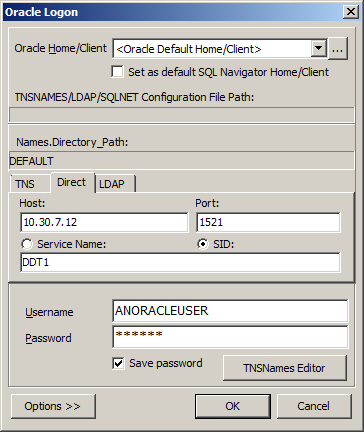
        <property name="connection.url">jdbc:oracle:thin:@10.30.7.12:1521:DDT1</property>
        <property name="connection.username">ANORACLEUSER</property>
        <property name="connection.password">ANORACLEUSER2016ac</property>
        <property name="connection.driver_class">oracle.jdbc.driver.OracleDriver</property>
        <mapping resource="com/javatexample/database/domain/employee.hbm.xml"/>
    </session-factory>
</hibernate-configuration>
- MySql
<?xml version="1.0" encoding="UTF-8"?>
<!DOCTYPE hibernate-configuration PUBLIC "-//Hibernate/Hibernate Configuration DTD 3.0//EN" "http://hibernate.sourceforge.net/hibernate-configuration-3.0.dtd">
<hibernate-configuration>
  <session-factory>
    <property name="hibernate.dialect">org.hibernate.dialect.MySQLDialect</property>
    <property name="hibernate.connection.driver_class">com.mysql.jdbc.Driver</property>
    <property name="hibernate.connection.url">jdbc:mysql://localhost:3306/sakila</property>
    <property name="hibernate.connection.username">root</property>
    <property name="hibernate.connection.password">root</property>
    <property name="hibernate.show_sql">true</property>
    <property name="hibernate.current_session_context_class">thread</property>
    <property name="hibernate.query.factory_class">org.hibernate.hql.classic.ClassicQueryTranslatorFactory</property>
    <mapping resource="dvdrental/FilmActor.hbm.xml"/>
    <mapping resource="dvdrental/Language.hbm.xml"/>
    <mapping resource="dvdrental/Film.hbm.xml"/>
    <mapping resource="dvdrental/Category.hbm.xml"/>
    <mapping resource="dvdrental/Actor.hbm.xml"/>
    <mapping resource="dvdrental/FilmCategory.hbm.xml"/>
    
<mapping class="test.Person"/>

  </session-factory>
</hibernate-configuration>


10. Lấy tạm đổi tượng connection cho việc test dữ liệu 
public Connection init() throws ServletException {
        Connection connection = null;
        try {
//            Class.forName("org.gjt.mm.mysql.Driver");
//            String dbURL = "jdbc:mysql://localhost/struts2db";
//            String username = "root";
//            String password = "root123";
            Class.forName("oracle.jdbc.driver.OracleDriver");
            String dbURL = "jdbc:oracle:thin:@11.31.7.12:1521:DDVV1";
            String username = "SLEPORT";
            String password = "se@@2016";
            connection = DriverManager.getConnection(
                    dbURL, username, password);
        } catch (ClassNotFoundException e) {
            System.out.println("Database driver not found.");
        } catch (SQLException e) {
            System.out.println(
                    "Error opening the db connection: "
                    + e.getMessage());
        }
        return connection;
    }

11. hibernate.hbm2dll.auto 
hibernate.hbm2ddl.auto Automatically validates or exports schema DDL to the database when the SessionFactory is created. With create-drop, the database schema will be dropped when the SessionFactory is closed explicitly.
e.g. validate | update | create | create-drop
So the list of possible options are,
  • validate: validate the schema, makes no changes to the database.
  • update: update the schema.
  • create: creates the schema, destroying previous data. The data previously present (if there) in the schema is lost
  • create-drop: drop the schema at the end of the session. The schema is not dropped on closing the session. It drops only on closing the SessionFactory.
These options seem intended to be developers tools and not to facilitate any production level databases, you may want to have a look at the following question; Hibernate: hbm2ddl.auto=update in production?

Sunday, August 28, 2016

Oracle SQL căn bản P1

Oracle/PLSQL FUNCTION

.1> REPLACE Function
Description
The Oracle/PLSQL REPLACE function replaces a sequence of characters in a string with another set of characters.

Syntax
REPLACE( string1_source, string_to_replace_source [, replacement_string_new_replace] )
ví dụ:
REPLACE('123123tech', '123');
Result: 'tech'

.2> Các hàm thống kê, ngày tháng, number, chuỗi

.3> INSTR ()

Hàm INSTR trả về vị trí của một chuỗi con trong một chuỗi cho trước.
Cú pháp:
INSTR( p_string, p_substring [, p_start_position [,  p_occurrence ] ] )
INSTR( string, substring [, start_position [, th_appearance ] ] )
Với 'th_appearance' là lần xuất hiện thứ th_appearance của substring, ngầm định là 1
ví dụ:
INSTR('Tech on the net', 'e')
Result: 2   (the first occurrence of 'e')

INSTR('Tech on the net', 'e', 1, 1)
Result: 2   (the first occurrence of 'e')

INSTR('Tech on the net', 'e', 1, 2)
Result: 11  (the second occurrence of 'e')

INSTR('Tech on the net', 'e', 1, 3)
Result: 14  (the third occurrence of 'e')

INSTR('Tech on the net', 'e', -3, 2)
Result: 2

.4 substr
The Oracle/PLSQL SUBSTR functions allows you to extract a substring from a string.
The syntax for the SUBSTR function in Oracle/PLSQL is:
SUBSTR( string, start_position [, length ] )
For example:
SUBSTR('This is a test', 6, 2)
Result: 'is'

SUBSTR('This is a test', 6)
Result: 'is a test'
Hàm mở rộng của SUBSTR là REGEXP_SUBSTR có cú pháp như sau:

Chi tiết:

REGEXP_SUBSTR( string, pattern [, start_position [, nth_appearance [, match_parameter [, sub_expression ] ] ] ] )
chú ý: 
[^ ]Used to specify a nonmatching list where you are trying to match any character except for the ones in the lis
Ví dụ:
SELECT REGEXP_SUBSTR ('TechOnTheNet is a great resource', '(\S*)(\s)', 1, 1)
FROM dual;

Result: 'TechOnTheNet '
SELECT REGEXP_SUBSTR ('TechOnTheNet is a great resource', '(\S*)(\s)', 1, 2)
FROM dual;

Result: 'is '

select regexp_substr('2234,5678','[^,]+', 1, level)
          from dual
          connect by regexp_substr('2234,5678','[^,]+', 1, level) is not null;

Result: '2234'
        '5678'
Những ví dụ trên đã gọi hàm REGEXP_SUBSTR( string, pattern [, start_position [, nth_appearance ] ] )

ví dụ khác:
-- có rCodes = '22er,1123,fecb,mnpq'
 select regexp_substr(rCodes,'[^,]+', 1, level) LCODE
                                    from dual
                                    connect BY regexp_substr(rCodes, '[^,]+', 1, level)
                                    is not null) ;
sẽ trả về các bản ghi
LCODE
---------
22er
1123
fecb
mnpq


.5 Hàm NVL
The Oracle/PLSQL NVL function lets you substitute a value when a null value is encountered.
The syntax for the NVL function in Oracle/PLSQL is:
NVL( string1, replace_with )
For example:
SELECT NVL(supplier_city, 'n/a')
FROM suppliers;
The SQL statement above would return 'n/a' if the supplier_city field contained a null value. Otherwise, it would return the supplier_city value.
.6 Hàm NLSSORT
NLSSORT returns the string of bytes used to sort char.
Ví dụ:
select * from TABLE1 order by nlssort(ename,'nls_sort=vietnamese')
VIETNAM collation:
CREATE INDEX emp_idx1 ON emp(NLSSORT(ename, 'NLS_SORT=Vietnamese'));

.7 Hàm to_date
In Oracle, TO_DATE function converts a string value to DATE data type value using the specified format. In SQL Server, you can use CONVERT or TRY_CONVERT function with an appropriate datetime style.
-- Specify a datetime string and its exact format
  SELECT TO_DATE('2012-06-05', 'YYYY-MM-DD') FROM dual;

.8 Hàm TRUNC
The syntax for the TRUNC function in Oracle/PLSQL is:
TRUNC ( date [, format ]
Ví dụ: SELECT TRUNC(sysdate,'MM') FROM dual; -- trả về 9/1/2016
SELECT TRUNC(TO_DATE('22-SEP-2016'),'MM') FROM dual; -- trả về 9/1/2016
SELECT TRUNC(TO_DATE('22-SEP-2016')) FROM dual; -- trả về 0 giờ, 0 phút, 0 giây ngày 9/22/2016

.9 Hàm DECODE
The syntax for the DECODE function in Oracle/PLSQL is:
DECODE( expression , search , result [, search , result]... [, default] )
Parameters or Arguments
expression
The value to compare.
search
The value that is compared against expression.
result
The value returned, if expression is equal to search.
default
Optional. If no matches are found, the DECODE function will returndefault. If default is omitted, then the DECODE function will return null (if no matches are found).
Example
The DECODE function can be used in Oracle/PLSQL.
You could use the DECODE function in a SQL statement as follows:
SELECT supplier_name,
DECODE(supplier_id, 10000, 'IBM',
                    10001, 'Microsoft',
                    10002, 'Hewlett Packard',
                    'Gateway') result
FROM suppliers;
The above DECODE statement is equivalent to the following IF-THEN-ELSE statement:
IF supplier_id = 10000 THEN
   result := 'IBM';

ELSIF supplier_id = 10001 THEN
   result := 'Microsoft';

ELSIF supplier_id = 10002 THEN
   result := 'Hewlett Packard';

ELSE
   result := 'Gateway';

END IF;

The DECODE function will compare each supplier_id value, one by one.

.10 Hàm WM_CONCAT
WM_CONCAT is an undocumented function and as such is not supported by Oracle for user applications (MOS Note ID 1336219.1). Also, WM_CONCAT has been removed from 12c onward, so you can't pick this option.
It let you aggregate data from a number of rows into a single row, giving a list of data associated with a specific value. Using the SCOTT.EMP table as an example, we might want to retrieve a list of employees for each department.
Base Data:

    DEPTNO ENAME
---------- ----------
        20 SMITH
        30 ALLEN
        30 WARD
        20 JONES
        30 MARTIN
        30 BLAKE
        10 CLARK
        20 SCOTT
        10 KING
        30 TURNER
        20 ADAMS
        30 JAMES
        20 FORD
        10 MILLER

Desired Output:

    DEPTNO EMPLOYEES
---------- --------------------------------------------------
        10 CLARK,KING,MILLER
        20 SMITH,FORD,ADAMS,SCOTT,JONES
        30 ALLEN,BLAKE,MARTIN,TURNER,JAMES,WARD
If you are not running 11g Release 2 or above, but are running a version of the database where the WM_CONCAT function is present, then it is a zero effort solution as it performs the aggregation for you:
COLUMN employees FORMAT A50

SELECT deptno, wm_concat(ename) AS employees
FROM   emp
GROUP BY deptno;

    DEPTNO EMPLOYEES
---------- --------------------------------------------------
        10 CLARK,KING,MILLER
        20 SMITH,FORD,ADAMS,SCOTT,JONES
        30 ALLEN,BLAKE,MARTIN,TURNER,JAMES,WARD

3 rows selected.
Description
REGEXP_LIKE return boolean value ofregular expression matching in the WHERE clause.

Syntax
REGEXP_LIKE ( expression, pattern [, match_parameter ] )
ví dụ:
select rowid, REGISTER_NUMBER from document WHERE REGISTER_NUMBER is not null and  regexp_like(REGISTER_NUMBER, '^[0-9]+$');
SELECT rowid, (case when Not regexp_like(d.register_number, '^[0-9]+[0-9+-.\s]*$') then 0 else to_number(d.register_number) end) reg FROM document d order by reg desc;

Một số câu lệnh Oracle căn bản

  • select substr(txt, instr(txt, ',', 1, level) + 1,  instr(txt, ',', 1, level + 1) -instr(txt, ',', 1, level) -1) as token  from  (select ',' || '?' || ',' txt  from dual ) connect by level < length(txt) -length(replace(txt, ',', ''));
    => Kết quả:
    1 ?
  • select ',aa,bb,' || 'cc,dd' || ',' txt  from dual;
  • select  level from    dual connect by level <= 10;
  • ALTER TABLE fee_invoice ADD (id  NUMBER(15,0));
  • ALTER TABLE fee_invoice ADD PRIMARY KEY (id)
  • ALTER TABLE staff_abc ADD PRIMARY KEY (abc_code,staff_abc_code)
  • ALTER TABLE staff_abc ADD CONSTRAINT staff_abc_pk PRIMARY KEY (abc_code,staff_abc_code);
  • ALTER TABLE supplier DROP CONSTRAINT supplier_pk;
  • ALTER TABLE stock_daily_record ADD CONSTRAINT fk_stock_daily_record FOREIGN KEY (STOCK_ID) REFERENCES stock(STOCK_ID); 
  • ESCAPE in LIKE Conditions:
    The syntax for the LIKE condition in SQL is:
    expression LIKE pattern [ ESCAPE 'escape_character' ]
    Parameters or Arguments
    expression
    A character expression such as a column or field.
    pattern
    A character expression that contains pattern matching. The wildcards that you can choose from are:
    WildcardExplanation
    %Allows you to match any string of any length (including zero length)
    _Allows you to match on a single character
    ESCAPE 'escape_character'
    Optional. It allows you to pattern match on literal instances of a wildcard character such as % or _.
    For example:
    SELECT *
    FROM suppliers
    WHERE supplier_name LIKE 'Water!%' ESCAPE '!';
    This Oracle LIKE condition example identifies the ! character as an escape character. This statement will return all suppliers whose name is Water%.
    SELECT last_name 
       FROM employees
       WHERE last_name 
       LIKE '%A\_B%' ESCAPE '\'; => '_' sẽ là ký tự literal.
    select * from shop s where s.shop_path like '%_$$1234%'   escape  '$'; => chứa 1 ký tự $
    select * from shop s where s.shop_path like '%_$\_1234%'   escape  '\';
    
  • IN, ANY, ALL, EXISTS
    Toán tử ANY chỉ ra bất kỳ giá trị liệt kê trong danh sách. ALL là tất cả các giá trị trong danh sách. EXISTS là tồn tại 1 bản ghi trả về trong câu truy vấn.
  • từ khóa HAVING: sẽ lọc kết quả truy vấn để lấy về 1 kết quả như mong muốn.
  • Kết nối các bảng csdl: join (inner join), left join, right join, full join
  • câu lệnh SELECT gồm những phép toán sau:
    >>Phép chiếu (Prjection): chỉ ra những column trong table muốn lấy data
    >>Phép chọn (Selection): lọc số lượng dòng dữ liệu cần lấy về từ 1 bảng
    >>Phép liên kết bảng (JOIN): lấy dữ liệu từ nhiều table thông qua kết nối các table với nhau bằng từ khóa join, left join, right join, full join
  • Hierarchical Queries


    Cú pháp:

    SELECT [COLUMNS]
    
    FROM TABLE_NAME
    
    START WITH [COLUMN] = [ROOT NODE VALUE]
    
    CONNECT BY [CONDITION]

    Ví dụ:

    Let’s analyze it: the CONNECT BY clause, mandatory to make a hierarchical query, is used to define how each record is connected to the hierarchical superior.
    The father of the record having MGR=x has EMPNO=x.
    On the other hand, given a record with EMPNO=x, all the records having MGR=x are his sons.
    The unary operator PRIOR indicates “the father of”.
    START WITH clause is used to from which records we want to start the hierarchy, in our example we want to start from the root of the hierarchy, the employee that has no manager.
    The root of the hierarchy could be not unique. In this example it is.
    The LEVEL pseudocolumn indicates at which level each record stays in the hierarchy, starting from the root that has level=1.
    connect by level là vị trí trong hệ thống phân cấp của bản ghi hiện hành trong mối qua hệ với nút gốc (root node). Nó cũng đặc tả mối quan hệ giữa parent rows và child rows của hệ thống phân cấp các bản ghi do có cột này là parent của cột kia trong 1 bảng CSDL. => level cũng sẽ giới hạn số dòng trả về, ví dụ: bằng số INPUT truyền vào.

Một số khái niệm RDBMS

PL/SQL trong oracle  là Procedural Language/Structured Query Language, tương đương với một ngôn ngữ lập trình hướng thủ tục được áp dụng trong oracle để viết ra các function/procedure thay vì sử dụng các câu truy vấn DB thông thường.
Function: trả về giá trị, về căn bản sẽ không có tham số kiểu OUT or IN OUT
Procedure: tương thự hàm void trong java, không trả về giá trị, nhưng lại có tham số kiểu OUT hoặc INOUT tương đương với trị trả về.
Hình sau nếu rõ Cấu trúc căn bản của khối lệnh PL/SQL:

DDL = data definition language, to create a database schema with CREATE and ALTER statements, creating tables, indexes, sequences, .. it is used to define data structures.
DML = data manipulation language to manipulate and retrieve data (insertions, updates, and deletions, retrieve data by executing queries with restrictions, projections, and join operations (including the Cartesian product). For  reporting, use SQL to group, order, and aggregate data as necessary; nest SQL statements inside each other (subselects)

Vendor Support for Catalog and Schema Objects
VendorCatalogSchema
OracleDoes not support catalogs. When specifying database objects, the catalog field should be left blank.Typically the name of an Oracle user ID.
  • server instance == database == catalog == all data managed by same execution engine
  • schema == namespace within database, identical to user account
  • user == schema owner == named account, identical to schema, who can connect to database, who owns the schema and use objects possibly in other schemas to identify any object you need (schema name + object name)


Popular Posts

Blog Archive