With the emerging of reactjs and angular2, zk and other old ui java frameworks are standing before of going to history library but now angular2 has been integrated into zk and make it having more custom chosen for users so that zk framework is still used for maintainance and new java projects.
Angular 2 is integrated in zk by using client command binding to communicate with a Java ViewModel at the server-side.
Hiển thị các bài đăng có nhãn Angular. Hiển thị tất cả bài đăng
Hiển thị các bài đăng có nhãn Angular. Hiển thị tất cả bài đăng
Thứ Bảy, 9 tháng 5, 2020
Thứ Bảy, tháng 5 09, 2020
Angular 2 with ZK
Chủ Nhật, 13 tháng 1, 2019
Chủ Nhật, tháng 1 13, 2019
Angular in Netbeans IDE
Requirements:
Run commands:
- Netbeans IDE 8.2
- Git-2.20.1-64-bit
- npm installed
- netbeanstypescript-2.x.nbm
Run commands:
 npm install -g bower
 npm install -g typescript
Thứ Ba, 1 tháng 1, 2019
Thứ Ba, tháng 1 01, 2019
Angular 7 vs React
Angular is a fully-fledged MVC framework, while React is simply a JavaScript library. This post compares what each one gives you, what you need to learn, and when to choose which.
What you get out of the box
Angular provides
- Templates, based on an extended version of HTML
- XSS protection
- Dependency injection
- Ajax requests via
@angular/http - Routing via
@angular/router - Component CSS encapsulation
- Utilities for unit-testing components
@angular/formsfor building forms- "Write once, run everywhere"
React provides
- JSX, an XML-like language, instead of classic templates
- JavaScript
- XSS protection
- No dependency injection
fetchfor Ajax requests- Utilities for unit-testing components
- "Learn once, write anywhere"
Chủ Nhật, 8 tháng 4, 2018
Chủ Nhật, tháng 4 08, 2018
Add Kendo UI into Angular Quickstart sample
SystemJS is a dynamic ECMAScript (ES) module loader that is used by Angular Quickstart and other projects.
To use Kendo UI components for Angular with SystemJS, you have to explicitly list the package entry points. This article demonstrates how to implement the required configuration when you use the Angular Quickstart project template.
The source code for the completed sample project is available on GitHub at telerik/kendo-angular-quickstart.
Thứ Bảy, 7 tháng 4, 2018
Thứ Bảy, tháng 4 07, 2018
Beginning Kendo UI
1. What is Kendo UI
Kendo UI is a comprehensive framework which comes with a library of 70+ UI widgets, an abundance of data-visualization gadgets, client-side data source, and a built-in MVVM (Model-View-ViewModel) library. It provides AngularJS and Bootstrap integration and is also distributed as part of several product units that you can choose from depending on your project requirements.Install kendo ui core for jsp anh html application:
- Step 0 Dowload from https://github.com/telerik/wrappers-getting-started/tree/master/jsp/jsp-episode1/WebContent OR Download full files from download any of the Kendo UI bundles to local computer.
- Step 1 Extract the
/jsand/stylesdirectories from the bundle archive and copy them to your web application root directory.
Step 2 Include the Kendo UI JavaScript and CSS files in theheadtag of your HTML document. Verify that the common CSS file is registered before the theme CSS file. - Step 3 Initialize a Widget.
The following example demonstrates how to initialize the DatePicker widget.
Thứ Ba, 17 tháng 10, 2017
Thứ Ba, tháng 10 17, 2017
Spring Boot REST + Angular 2 + JPA + Hibernate + MySQL CRUD Example
We will create a REST web service
application using Spring Boot and a client application using Angular 2.
REST web service will expose methods for create, read, update and delete
operation. The Angular application will use Angular
There are back-end application using spring-boot rest api and front-end application using Angular 2.
Http
API for CRUD operation. If our client application is running on
different domain from web service domain, then the Spring Boot web
service controller will configure client domain URL using @CrossOrigin
annotation to handle Cross-Origin-Resource-Sharing (CORS). In our Spring Boot application, we will configure database
using application.properties file. To interact with database we will use JPA EntityManager.There are back-end application using spring-boot rest api and front-end application using Angular 2.
Thứ Bảy, 7 tháng 10, 2017
Thứ Bảy, tháng 10 07, 2017
Connecting your Angular 2 App to your Java EE Backend
1. Introduction
You’ve been developing in Java EE all this time, but you’re tired of using JSF, or perhaps even Struts, and want to move to something more modern for your front end? Angular 2 is a perfect fit, and with the recent release of Angular 2 GA, now is the ideal time to make the move! Besides being easier to develop and maintain, an Angular 2 application allows you to take advantage of the huge improvements in browser technology over the last few years, and all the goodness that the modern web brings.Broad Strokes
We will be working with two separate applications, a Java EE back-end app, and an Angular 2 front-end app, avoiding a mixing of concerns in a single project. Source for both projects is provided, so in this article we display and highlight source only for key concepts – you can download the projects to look at more detail, or run them locally.Key technologies:
- JPA: Our sample Java EE application uses JPA to access data from a database.
- REST: We expose the table data via REST web services using Jersey – the reference implementation for the JAX-RS spec.
- RxJS: Our Angular 2 app uses RxJS to communicate with the web services.
Thứ Năm, 5 tháng 10, 2017
Thứ Năm, tháng 10 05, 2017
HTML attribute vs. DOM property in Angular
1-HTML attribute vs. DOM property
The distinction between an HTML attribute and a DOM property is crucial to understanding how Angular binding works.
Attributes are defined by HTML. Properties are defined by the DOM (Document Object Model).
- A few HTML attributes have 1:1 mapping to properties.
idis one example. - Some HTML attributes don't have corresponding properties.
colspanis one example. - Some DOM properties don't have corresponding attributes.
textContentis one example. - Many HTML attributes appear to map to properties ... but not in the way you might think!
Thứ Ba, 3 tháng 10, 2017
Thứ Ba, tháng 10 03, 2017
Angular quick-reference guide
🇬🇧 English Version
A quick-reference guide to the core concepts of Angular: Observables, RxJS, NgModules, Dependency Injection, HttpClient, Router, and Animations.
Table of contents
Thứ Ba, tháng 10 03, 2017
Angular Forms
Introduction to forms in Angular
Handling user input with forms is the cornerstone of many common applications. Applications use forms to enable users log in, to update a profile, to enter sensitive information, and to perform many other data-entry tasks.Angular provides two different approaches to handling user input through forms: reactive and template-driven. Both capture user input events from the view, validate the user input, create a form model and data model to update, and provide a way to track changes.
Reactive and template-driven forms differ, however, in how they do the work of processing and managing forms and form data. Each offers different advantages.
In general:
- Reactive forms are more robust: they are more scalable, reusable, and testable. If forms are a key part of your application, or you're already using reactive patterns for building your application, use reactive forms.
- Template-driven forms are useful for adding a simple form to an app, such as an email list signup form. They are easy to add to an app, but they do not scale as well as reactive forms. If you have very basic form requirements and logic that can be managed solely in the template, use template-driven forms.
Thứ Hai, 2 tháng 10, 2017
Thứ Hai, tháng 10 02, 2017
angular components and templates
Displaying Data
The live example / download example demonstrates all of the syntax and code
snippets described in this page.
Showing component properties with interpolation
The easiest way to display a component property is to bind the property name through interpolation. With interpolation, you put the property name in the view template, enclosed in double curly braces:{{myHero}}.When you bootstrap with the
AppComponent class (in main.ts), Angular looks for a <app-root>
in the index.html, finds it, instantiates an instance of AppComponent, and renders it
inside the <app-root> tag.Chủ Nhật, 1 tháng 10, 2017
Chủ Nhật, tháng 10 01, 2017
Angular2 Architecture Overview
Angular is a framework for building client applications in HTML and
either JavaScript or a language like TypeScript that compiles to JavaScript.
The framework consists of several libraries, some of them core and some optional.
You write Angular applications by composing HTML templates with Angularized markup, writing component classes to manage those templates, adding application logic in services, and boxing components and services in modules.
Then you launch the app by bootstrapping the root module. Angular takes over, presenting your application content in a browser and responding to user interactions according to the instructions you've provided.
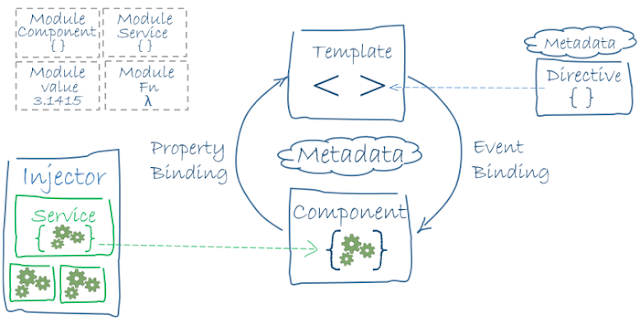
The framework consists of several libraries, some of them core and some optional.
You write Angular applications by composing HTML templates with Angularized markup, writing component classes to manage those templates, adding application logic in services, and boxing components and services in modules.
Then you launch the app by bootstrapping the root module. Angular takes over, presenting your application content in a browser and responding to user interactions according to the instructions you've provided.

Thứ Bảy, 23 tháng 9, 2017
Thứ Bảy, tháng 9 23, 2017
Angular QuickStart
1-What is Angular?
Angular is a platform that makes it easy to build applications with the web. Angular combines declarative templates, dependency injection, end to end tooling, and integrated best practices to solve development challenges. Angular empowers developers to build applications that live on the web, mobile, or the desktop
Chủ Nhật, 19 tháng 3, 2017
Chủ Nhật, tháng 3 19, 2017
Struts2 AngularJS integration
In this post, we will learn to implement AJAX calls from a JSP page to a Struts 2 Action class using AngularJS and update the same JSP page back with the Json response from the Struts 2.
Library Required
Since Angular can send and receive only in json format, to handle it you need struts2-json-plugin-2.x.x.jar. This plugin allows you to serialize the Action class attribute which has getter and setter into a JSON object.
Chủ Nhật, tháng 3 19, 2017
Struts2 AngularJS Insert Operation
As for the user interface, rather than Bootstrap, we'll use materialize
CSS – a modern responsive front-end framework based mostly additionally
on Google’s Material design.

FILE STRUCTURE
Knowing the file structure can offer us an outline of what Struts2 files can we need to create and wherever the assets should be placed.Thứ Bảy, 18 tháng 3, 2017
Thứ Bảy, tháng 3 18, 2017
Cài đặt AngularJS 1.x với ví dụ giản đơn
Cài đặt AngularJS
Sau khi đã có những khái niệm căn bản về AngularJS, chúng ta sẽ tiến hành cài đặt để sử dụng AngularJS:
Step 1: Tải tệp angular.min.js từ URL https://ajax.googleapis.com/ajax/libs/angularjs/1.2.32/angular.min.js, rồi copy file vào thư mục js.
Step 2: Khai báo thư viện AngularJS trong tệp HTML:
<head>
<script src="js/angular.min.js"></script>
</head>
Step 3: Khai báo thẻ gốc muốn áp dụng AngularJS với từ khóa ng-app. Thẻ với từ khóa này chỉ ra sự khởi đầu ứng dụng AngularJS:
<div ng-app>
</div>
Step 4: Sử dụng các thuộc tính ng-model, ng-bind và các thẻ khác bên trong thẻ gốc ng-app để xây dựng các trang web với AngularJS.
Ví dụ hoàn chỉnh như sau:
<!doctype html>
<html lang="en">
<head>
  <meta charset="UTF-8">
  <title>Example - example-guide-concepts-1-production</title>
  <script src="js/angular.min.js"></script>
</head>
<body>
  <div ng-app ng-init="qty=1;cost=2">
    <b>Invoice:</b>
    <div>
      Quantity: <input type="number" min="0" ng-model="qty">
    </div>
    <div>
      Costs: <input type="number" min="0" ng-model="cost">
    </div>
    <div>
      <b>Total:</b> {{qty * cost | currency}}
    </div>
  </div>
</body>
</html>
Thứ Bảy, tháng 3 18, 2017
Kiến trúc AngularJS 1.x
AngularJS là gì?
AngularJS là một web application framework mã nguồn mở dựa trên JavaScript để tạo ra các ứng dụng RICH Internet Application(RIA) hay ứng dụng sử dụng mô hình MVVM (Model-View-ViewModel).
có thể coi AngularJS tương tự như jQuery nhưng có nhiều tính năng hỗ trợ hơn cung cấp RESTful API, Two-Way data binding,..
AngularJS là một framework để có thể tạo được những ứng dụng web quy mô lớn và performance cao mà vẫn giữ duy trì được tính năng dễ dàng trong việc bảo trì.
Download tại https://angularjs.org/
Thứ Năm, 16 tháng 6, 2016
Thứ Năm, tháng 6 16, 2016
Angular vs React : A Side-By-Side Comparison
When
starting out with Front-end programming one will run across Angular and
React pretty quickly. Currently the JavaScript scene is changing at a
very rapid pace, and new technology is coming out every day it seems
like. While some may think this is a good thing and others a bad thing,
that is besides the point. At this point in time it seems that Angular
and React are the two big players that everyone is using. In 6 months or
a year that could all change, and as a programmer you should be able to
adapt to that change easily.
There are a lot of articles out there about Angular vs React, and a
lot of them tend to take a biased side to either one or the other. We
can argue that Angular is more popular, and that React makes you a
better JavaScript programmer all day long. However, I am not interested
in that. I am interested in the cold hard comparisons of what makes each
platform different. As a reference, I started writing this article with
little to no knowledge of how to use either platform. I believe that
this lack of knowledge gives me some form of a non-biased viewpoint on
it. I will simply report on what I find and do a side by side comparison
of the two frameworks.
I went out and compiled the information I could find on the two frameworks (And Angular 1.0). Below you will see what the results of this research show.
This table is pretty straight forward, Angular is by Google and React is by Facebook.
I went out and compiled the information I could find on the two frameworks (And Angular 1.0). Below you will see what the results of this research show.
The Basics
| Attribute | AngularJS | Angular 2 | React |
|---|---|---|---|
| Version | 1.5.0-rc1 / 1.49 | 2.0.0 - In Beta | 0.14.6 |
| Author | |||
| Language | JavaScript/HTML | TypeScript | JSX |
| Size | 143k | 764k | 151k |
| Github Stars | 46.4k | 8.4k | 34.4k |
| Github Contributors | 1,386 | 189 | 604 |